
Menu generator
Basics
Section titled “Basics”A generated menu is built from four pieces:
-
Catalog - the source of objects (players online, custom items, regions, …). Optional filters narrow the list.
-
Matrix - a grid of cells where items get placed. The matrix must have as many rows as the menu itself.
-
Item templates - the appearance of catalog entries. Templates use catalog placeholders like
%ctg_player_name%. -
Pagination - generated menus can span multiple pages; navigation actions move between them.
All catalogs are listed in the end of this page. Here we will show you how to create a simple generated menu. For example we will use the PLAYERS catalog, that generates a list of all players on the server.
title: "Generated Menu"size: 4
catalog {  type: PLAYERS}
matrix {  cells: [    "_________",    "_xxxxxxx_",    "_xxxxxxx_",    "_________"  ]  templates {    "x" {      skullOwner: "%ctg_player_name%"      name: "&7Player &e%ctg_player_name%"    }  }}
Here we have created a menu with 4 rows. Once we have specified the catalog parameter, the plugin will assume that our menu is auto-generated.
-
catalog- Catalog configuration. It always hastypeparameter. Thetypeis a name of the catalog. It can also contains other parameters, depends on the catalog type. -
cells- This is a list of strings, represents a matrix of cells. Each line of this list is a menu row. Each symbol in the line represents an inventory slot. The_character (or any other character that absent in thetemplatesblock) means an empty slot, that is, no item will be added to that slot. Thexcharacter is the tag which we added before. This means that only the item of the templatexand no other item can be added to this inventory slot. -
templates- Binding items to some tag. Each matrix template must have its own tag. A tag is any Latin character fromatoz, or a special character. After we have created the tag, we can bind any item to it. Note you don’t need to specify slot for item, since a slot is automatically computes while generating menu.
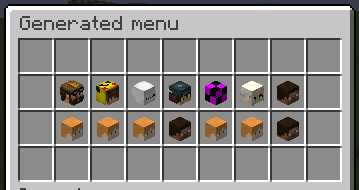
As a result, with enough players on the server, we will get menu looks like this:
Switch pages
Section titled “Switch pages”The catalog can contain many objects, so the menu can be paginated when generates. To switch these pages, there is two special actions: pageNext and pagePrev, which switch to the next or previous page respectively.
To add buttons for pages switching, you need to define a list of static buttons, as we would do in a simple menu. Example:
title: "Generated menu"size: 4
catalog {  type: PLAYERS}
matrix {  cells: [    "_________",    "_xxxxxxx_",    "_xxxxxxx_",    "_________"  ]
  templates {    "x" {      skullOwner: "%ctg_player_name%"      name: "&7Player &e%ctg_player_name%"    }  }}
items: [  {    slot: 27    material: ARROW    name: "&e&l<<"    click {      pagePrev: 1    }  },  {    slot: 35    material: ARROW    name: "&e&l>>"    click {      pageNext: 1    }  }]
Here we have specified the static items with actions for switching the pages of the generated menu. These items will be displayed on all pages of the menu (until we specify some rules for their display). Thus, we can specify any static items in which placeholders from the catalog will also work.
Placeholders
Section titled “Placeholders”The important part of the auto-generated menus is a context placeholders. Each catalog uses one of the Value Extractors. The usage of these extractor is similar to how they are used for activator context. The only difference is the prefix: ctg_ instead of activator_.
During menu generation, placeholders are generated for each catalog’s object and can be used almost anywhere in the menu.
Catalog placeholders looks like this:
%ctg_<placeholder>%Here ctg_ is a prefix, short for catalog. The <placeholder> is a specific placeholder from value extractor which catalog uses, or one of the common catalog’s placeholders, which described in table below.
| Placeholder | Type | Description |
|---|---|---|
| page | Number | Current page index |
| pages | Number | Total amount of menu pages |
| page_next | Number | Next page index |
| page_prev | Number | Previous page index |
| elements | Number | Total amount of catalog objects |
For example, to use the page placeholder from this list, you can write %ctg_page%.
Catalogs
Section titled “Catalogs”A catalog is a dynamic collection of objects of the same type. Each catalog has its own unique name. The catalog can also have additional parameters that you can specify in the same catalog block.
Each catalog provides own placeholders due one of the Value Extractor. To know that placeholders you can use with some catalog, just look at the placeholders which provides extractor which catalog uses. Then just add ctg_ prefix. These placeholders can be used in templates for generation. Below are the default catalogs currently available in AbstractMenus.
Players
Section titled “Players”Type: PLAYERS
Extractor type: extractor-entity
Returns all online players on the server. Since this catalog uses extractor-entity and all objects in the provided collection are Players, you can use any regular placeholder with the ctg_ prefix when you use this catalog type. Example:
catalog {  type: PLAYERS}
matrix {  cells: [    "_________",    "_xxxxxxx_",    "_xxxxxxx_",    "_________",  ]  templates {    "x" {      skullOwner: "%ctg_player_name%"      name: "Player level is %ctg_player_level%"    }  }}
That is, after the ctg_ prefix, we can write any placeholder (without the % chars), and this will be replaced in the context of the player from the catalog.
In this case, we used player_name placeholder (it exists in PlaceholderAPI and bundled placeholders).
Worlds
Section titled “Worlds”Type: WORLDS
Extractor type: extractor-world
Returns all worlds of the server.
Entities
Section titled “Entities”Type: ENTITIES
Extractor type: extractor-entity
Returns all entities of the player’s world (or a specified world). Optional filters narrow the result.
world- Optional. World name. If specified, returns entities from that world instead of the viewer’s. Placeholders are supported.allowedTypes- Optional. List of strings. If this parameter is specified, only entities of the specified types are returned. See all entity types here.
Example:
catalog { type: ENTITIES world: "world_nether" allowedTypes: [ ZOMBIE, SKELETON ]}BungeeCord servers
Section titled “BungeeCord servers”Type: BUNGEE_SERVERS
Extractor type: Own extractor. See placeholder below
Returns all BungeeCord servers. Works only if bungeecord: true is set in the plugin configuration. This catalog uses own extractor with that placeholders:
| Placeholder | Type | Description |
|---|---|---|
| server_name | String | Server name |
| server_online | Number | Amount of players on the server |
Iterator
Section titled “Iterator”Type: ITERATOR
Extractor type: Own extractor. See placeholder below
Returns a generated list of numbers from A to B. Useful for generating an exact number of items from a template.
Has three parameters:
-
start- Number. Start value (inclusive) -
end- Number. The final value (inclusive) -
desc- [Optional]. Boolean. If true, numbers will be generated in reverse order. That is ifstartis 1, andendis 10, then it will generate10, 9, 8, ..., 1
Standard placeholders (not catalog placeholders) can be used for these parameters. This means that you can use, for example, the value of a variable.
This catalog uses own extractor with that placeholders:
| Placeholder | Type | Description |
|---|---|---|
| index | Number | Current number |
Type: slice
Extractor type: Own extractor. See placeholder below
Splits a string into a list of pieces by a separator. Useful when a placeholder hands you a comma-separated list and you want one menu element per piece.
catalog { type: slice value: "%my_csv_placeholder%" separator: "," trim: true}value- The string to split. Placeholders are resolved per viewer.separator- Separator passed toString.split(Java regex).trim- Optional. Iftrue, each element is trimmed. Defaulttrue.
The catalog skips empty pieces, so "a,,b" with , produces two elements (a, b), not three.
This catalog uses own extractor with that placeholders:
| Placeholder | Type | Description |
|---|---|---|
| slice_element | String | The current element |
So far, these are all available catalogs. In general, the catalog system is designed for independent expansion by the user to suit his needs. We will modify and add new catalogs over time.