
Text formatting
Colors codes
Section titled “Colors codes”As in most plugins, AM replaces & char to native Minecraft § color prefix. All text can be colorized. There is some examples below.
message: "&aSome &etext"You can use this cheat sheet to get required color code.
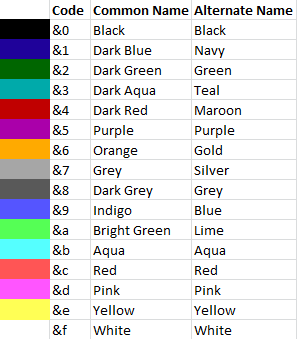
RGB colors
Section titled “RGB colors”Text can be colorized with RGB hex codes wrapped in <> brackets:
message: "<#00FF00>Some text"This text will be colorized into green color.
RGB colors can also be combined with color codes. Example:
message: "<#00FF00>Some &etext"MiniMessage format
Section titled “MiniMessage format”MiniMessage is a tag-based text format — <red>, <rainbow>...</rainbow>, <gradient:#FF0000:#0000FF>, <click:run_command:/foo>, <hover:show_text:'tooltip'>, etc.
AbstractMenus supports MiniMessage in messages and in item name / lore. It also works in books. Items render only the visual MiniMessage features (colors, gradients, decorations); interactive features like <click> and <hover> work in chat messages only.
Example of using MiniMessage in message action:
message: "<hover:show_text:'<red>test'>TEST"Example of using MiniMessage in item’s name and lore:
{ slot: 0 material: cake name: "<rainbow>Super Cake!</rainbow>" lore: [ "", "<yellow>Eat <blue>me!" ]}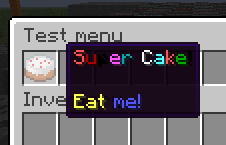
Result