
Item format
An item can be specified not only as a button in a menu. This object can be used in rules, actions and activators. However, item always has one format.
Properties by category
Section titled “Properties by category”Slot and cooldown
Section titled “Slot and cooldown”| Name | Data type | Example | Description |
|---|---|---|---|
| slot | Multiple | See Slot below | Where the item sits. Can be used only for menu items or in some actions and rules. |
| clickCooldown | Number | clickCooldown: 500 | Per-item click cooldown in milliseconds. Reset when the menu closes or refreshes. Below the server-wide click debounce floor the floor wins; set clickCooldown: 0 to bypass entirely. |
Material installers
Section titled “Material installers”Use exactly one of these to set the item’s material. The rest of the properties (display, mechanics) layer on top.
| Name | Data type | Example | Description |
|---|---|---|---|
| material | String | material: "DIAMOND_SWORD" | Set the item material by name. |
| texture | String | See Texture | Custom head texture by id, url, or base64. Many heads at https://minecraft-heads.com. |
| skullOwner | String | See Skull Owner | Set the player’s skin on a head. |
| hdb | String | hdb: "2853" | Head from HeadDatabase by id. |
| mmoitem | String | mmoitem: "WEAPON:MY_SWORD" | Item by type and id from MMOItems. |
| itemsAdder | String | itemsAdder: "<namespaced id>" | Custom stack from ItemsAdder registry. |
| oraxen | String | oraxen: "my_sword" | Custom stack from Oraxen. |
| equipItem | String or Object | See Equipped item | Take an item from a player’s inventory slot. |
| serialized | String | See Serialized | Deserialize an item from a base64 string. |
Display
Section titled “Display”| Name | Data type | Example | Description |
|---|---|---|---|
| name | String | name: "Peter Piper" | Display name. Supports & codes, <#RRGGBB> and (when useMiniMessage: true) MiniMessage tags. |
| lore | Strings list | See Lore | Lore lines under the name. Same color/MiniMessage rules as name. |
| nameLight | String | nameLight: "&aHi" | Legacy variant of name - only & codes, never parses MiniMessage. Use when the name contains < characters. |
| loreLight | Strings list | Same as lore | Legacy variant of lore - only & codes. |
| glow | Boolean | glow: true | Glowing effect (via invisible enchantment). |
| flags | Strings list | See Flag | Item flags. |
| color | String | — | Colorize armor or potion. |
| model | Number | model: 1234567 | Custom model data. |
Mechanics
Section titled “Mechanics”| Name | Data type | Example | Description |
|---|---|---|---|
| count | Number | count: 64 | Stack size. |
| damage | Number | damage: 100 | Damage (the bar under the item) on damageable items. Higher = less durability. |
| data | Number | data: 3 | Legacy data byte / durability value. Equivalent to damage on modern Bukkit; useful when porting pre-1.13 configs. |
| unbreakable | Boolean | unbreakable: true | Mark the item as unbreakable. |
| enchantments | Object | See Enchantments | Add enchantments. |
| enchantStore | Object | Same as enchantments | Store an enchantment on an ENCHANTED_BOOK for use at an anvil. |
| attributeModifier | Objects list | See Attribute modifier | Add attribute modifiers (damage, armor, speed, …). |
| potionData | Objects list | See Potion effect | Potion effects, if the item is a potion. |
| fireworkData | Object | See Firework | Firework explosion effects on FIREWORK_ROCKET. |
| bookData | Object | See Book | Author, title, pages on a writable book. |
| bannerData | Object | See Banner | Banner colors and patterns. |
| shieldData | Object | Similar to bannerData | Shield colors and patterns (uses banner format). |
| recipes | Objects list | — | Custom recipes on a KNOWLEDGE_BOOK. |
| nbt | Object | See NBT tags | Raw NBT tags. |
Conditional
Section titled “Conditional”| Name | Data type | Example | Description |
|---|---|---|---|
| bindings | Objects list | See Bindings | Override properties when rules match. The classic “show as red glass if player can’t afford” pattern. |
The item’s slot is the cell in the inventory (of the menu or player’s) where the item will be placed. The slot can be specified in several ways:
Way 1. X, Y coordinates
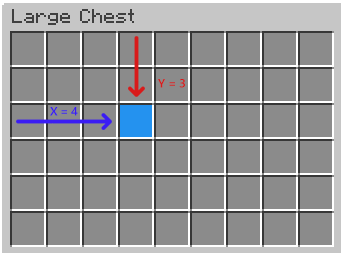
Section titled “Way 1. X, Y coordinates”slot: "4,3" // x,yIn this example, x and y means the horizontal and vertical position of the item, respectively. The countdown starts from 1. The image below can be useful to understanding this.
Way 2. Index
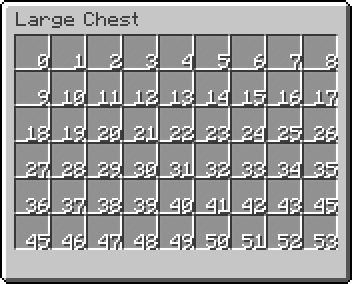
Section titled “Way 2. Index”slot: 0You can specify slot just by a real index. To find out the number of the desired slot, you can use this cheat sheet:
Way 3. Range
Section titled “Way 3. Range”slot: "0-6"To place one item inside several slots, you can use ranged slots format. An item with slot above will be placed in cells with index 0, 1, …, 6. This format can be useful to fill menu with some background item without manual putting them in every slot.
Way 4. Matrix
Section titled “Way 4. Matrix”items: [ { slot: [ "xxxxxxxxx", "x-------x", "x-------x", "x-------x", "x-------x", "xxxxxxxxx" ] material: BLACK_STAINED_GLASS_PANE }]If you need more complex positioning, you can specify slot as cells matrix. For example, you need set a border for your menu. You can make something like above. Then this will look like this:
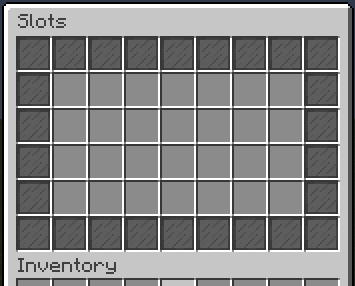
Every char of this matrix is a some slot.
Char - is always empty slot. Char x represents slots which will be filled with current item. You can specify any other char except -.
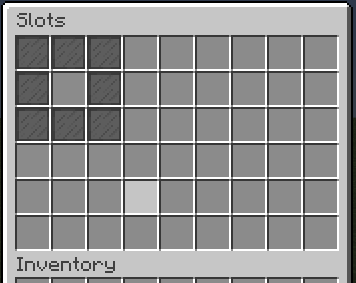
The size of matrix may be equal or less than size of menu. This mean, you can specify slot like that with the same size of menu:
slot: [ "xxx", "x-x", "xxx"]And menu will looks like this:
Skull Owner
Section titled “Skull Owner”This property can be used to get player’s head. It takes player name as argument. For example:
skullOwner: "Notch"If you need to get head of player who opened menu, use placeholder to get player name first:
skullOwner: "%player_name%"Texture
Section titled “Texture”You can specify texture using one of the following formats.
Texture URL
Section titled “Texture URL”Direct link to the texture image. Example:
texture: "https://textures.minecraft.net/texture/a45d68aea87cc3fd20b96b21e18255db298b2eac986526473116bd3b5750b787"Texture Hash
Section titled “Texture Hash”Texture hash is a sha-1 hash of skin image. This hash you can find in the end of each texture url, avoiding static https://textures.minecraft.net/texture/ prefix. Example:
texture: "a45d68aea87cc3fd20b96b21e18255db298b2eac986526473116bd3b5750b787"Using this way, the plugin will add the static prefix and a final url will be https://textures.minecraft.net/texture/a45d68aea87cc3fd20b96b21e18255db298b2eac986526473116bd3b5750b787
Base64 encoded
Section titled “Base64 encoded”Also often called “Texture value”. This is a url to texture, included in JSON and encoded using Base64 encoder. You can use such value with base64: prefix. Example:
texture: "base64:eyJ0ZXh0dXJlcyI6eyJTS0lOIjp7InVybCI6Imh0dHA6Ly90ZXh0dXJlcy5taW5lY3JhZnQubmV0L3RleHR1cmUvYTQ1ZDY4YWVhODdjYzNmZDIwYjk2YjIxZTE4MjU1ZGIyOThiMmVhYzk4NjUyNjQ3MzExNmJkM2I1NzUwYjc4NyJ9fX0="Equipped Item
Section titled “Equipped Item”Item property to get item from player’s inventory. By default it takes item from inventory of player who opened menu. Example:
equipItem: HEADBut you also can take item from another player’s inventory. For this you need to transform this property to object and set player name. Placeholders are supported. Example:
equipItem { player: "%player_name_placeholder%" slot: HEAD}Deserialize from base64 string
Section titled “Deserialize from base64 string”The serialized item property lets you deserialize an item from a base64 string. Such a string usually comes from the item_serialized extractor placeholder, for example, when using the drag-and-drop feature. Example:
{ slot: 0 serialized: "%moved_item_serialized%" // Placehodler returns base64 string name: "New item name" lore: "New item lore"}If add other item properties, like name they will replace present properties from deserialized item.
The lore is a list of strings. Each new line in the list is a line in the item’s lore. For example:
lore: [ "Line 1", "Line 2", "Line 3"]Enchantments
Section titled “Enchantments”Enchantments has format <enchantment>: <level> where:
<enchantment>
Bukkit’s enchantment name. You can find it here
<level>
Level of the enchantment. Minimal level is 1.
Example:
enchantments { DAMAGE_ALL: 1 DURABILITY: 2}Color used to paint items that support it, such as leather armor or potion. Color can be specified in one of 3 ways. In the examples, we will show a way to specify white color.
Way 1. RGB
Section titled “Way 1. RGB”RGB values (0-255) separated by comma.
color: "255,255,255" // r,g,bWay 1. Spigot color name
Section titled “Way 1. Spigot color name”Use a native Spigot color names.
color: WHITEWay 1. HEX
Section titled “Way 1. HEX”Hexadecimal format like in CSS.
color: "#FFFFFF"Flags are used to add new properties to item. The list of flags is a strings list like lore. For example:
flags: [ "HIDE_UNBREAKABLE", "HIDE_ENCHANTS",]Or if there is only flag:
flags: "HIDE_ATTRIBUTES"Spigot currently has the following flags:
-
HIDE_ATTRIBUTES- Hide item attributes such as damage. -
HIDE_DESTROYS- Hide the information about item durability. -
HIDE_ENCHANTS- Hide item enchantments. -
HIDE_PLACED_ON- Hide information that an item can be built/placed on something like this. -
HIDE_POTION_EFFECTS- Hide potion effects :D. -
HIDE_UNBREAKABLE- Hide theunbreakablelabel.
Potion effect
Section titled “Potion effect”This property is a list of objects containing effects of the potion. Each item in the list is a potion effect. Example:
potionData: [ { effectType: FAST_DIGGING duration: 100 amplifier: 1 }, { effectType: SPEED duration: 100 amplifier: 2 }]Each potion effect has 3 required parameters:
-
effectType- Potion effect type. All types can be found here. -
duration- Potion effect duration in ticks (1 second = 20 ticks). -
amplifier- Power (level) of the effect.
Firework
Section titled “Firework”To create a colored firework, use fireworkData property. Example:
fireworkData { power: 2 effects: [ { type: BALL trail: false colors: [ "#FFFFFF", "#FF0000" ] fadeColors: [ "#000000", "#00FF00" ] } ]}The power parameter set the lifetime of firework. This is optional parameter. By default its 1.
The effects parameter is a list of objects. Each object is a firework effect and has several parameters:
-
type- Type of the shape when firework explodes. You can find all firework types here. -
trail- Is firework has trail while launched. -
colors- List of colors when firework’s explode start. -
fadeColors- List of colors when firework’s explode fade.
You can add several objects in fireworkData property. Then it will explode with all specified effects.
This property can be used to create a written book with pages. Example:
bookData { author: "Peter Piper" title: "&e&lTitle" pages: [ "First page content", "Second page content" ]}This property has several parameters:
-
author- The book’s author which will be displayed. -
title- The displayed book’s title. -
pages- The list of strings. Each new line is a new page content.
Banner
Section titled “Banner”To create a decorated banner, use the bannerData property. There are two ways to use it:
Way 1. NBT
Section titled “Way 1. NBT”You can generate a banner in any banner designer, for example in this, and paste the result NBT as a string parameter. Example:
bannerData: "{BlockEntityTag: {Base: 12, Patterns: [{Pattern: hh, Color: 6}, {Pattern: vh, Color: 6}, {Pattern: lud, Color: 7}, {Pattern: tts, Color : 6}, {Pattern: vh, Color: 14}, {Pattern: cre, Color: 2}]}}"Way 2. HOCON
Section titled “Way 2. HOCON”A more complicated, but affordable way is to specify patterns as list of objects. Example:
bannerData: [ { type: BASE color: WHITE }, { type: MOJANG color: RED }]Each element of this list is a banner’s pattern. Each pattern has this parameters:
-
type- Type of the pattern. You can find all pattern types here. -
color- Color of the pattern. Spigot supports only named colors for banners.
Attribute modifier
Section titled “Attribute modifier”Add Bukkit AttributeModifier entries to the item. Useful for custom damage / armor / speed without writing raw NBT.
attributeModifier: [ { type: "generic.attack_damage" amount: 7 operation: "add_number" slot: HAND }, { type: "generic.armor" amount: 5 operation: "add_number" slot: CHEST }]Parameters:
type- The attribute key. Bukkit accepts the namespaced form (e.g.generic.attack_damage,generic.armor,generic.movement_speed). Internally lowercased.amount- Numeric modifier value. Default0.operation- One ofadd_number,add_scalar,multiply_scalar_1. Defaultadd_number.slot- Optional. Restrict the modifier to one equipment slot:HAND,OFF_HAND,HEAD,CHEST,LEGS,FEET. If omitted, the modifier applies in any slot.
NBT tags
Section titled “NBT tags”Using NBT, you can add properties for items that has not yet been added to the plugin. NBT tags can be specified here using HOCON or a regular string. For example, you can add a name to an item via NBT tag. Example:
{ slot: 0 material: IRON_PICKAXE nbt { display { Name: "&aMy pickaxe" } }}Inside the nbt property, you can write any HOCON constructs, and the plugin converts them to NBT tags on startup. Please note that many NBT tags differ on different versions of Minecraft. So, if some tag does not work, most likely you specified it wrong. One more example. Let’s add two enchantments to the item:
{ slot: 0 material: IRON_PICKAXE nbt { display { Name: "My pickaxe" } ench: [ { id: 34 lvl: 2 }, { id: 35 lvl: 3 } ] }}The ench parameter is a list of objects. The types and names of tags must exactly match those that must be in the final NBT.
Of course, you can add your own custom tags:
nbt { mytag1: "mytag" mytag2: 15 mytag3 { mytag1: "hello" }}Those tags will be added to the item. To check them you can use special plugins or mods.